06 / A shared Mac
One library for everything you love to watch, hear, and see.
Keep your files in their original folders. Find photos and videos by describing what you remember, and encrypt what you’d like to keep private.
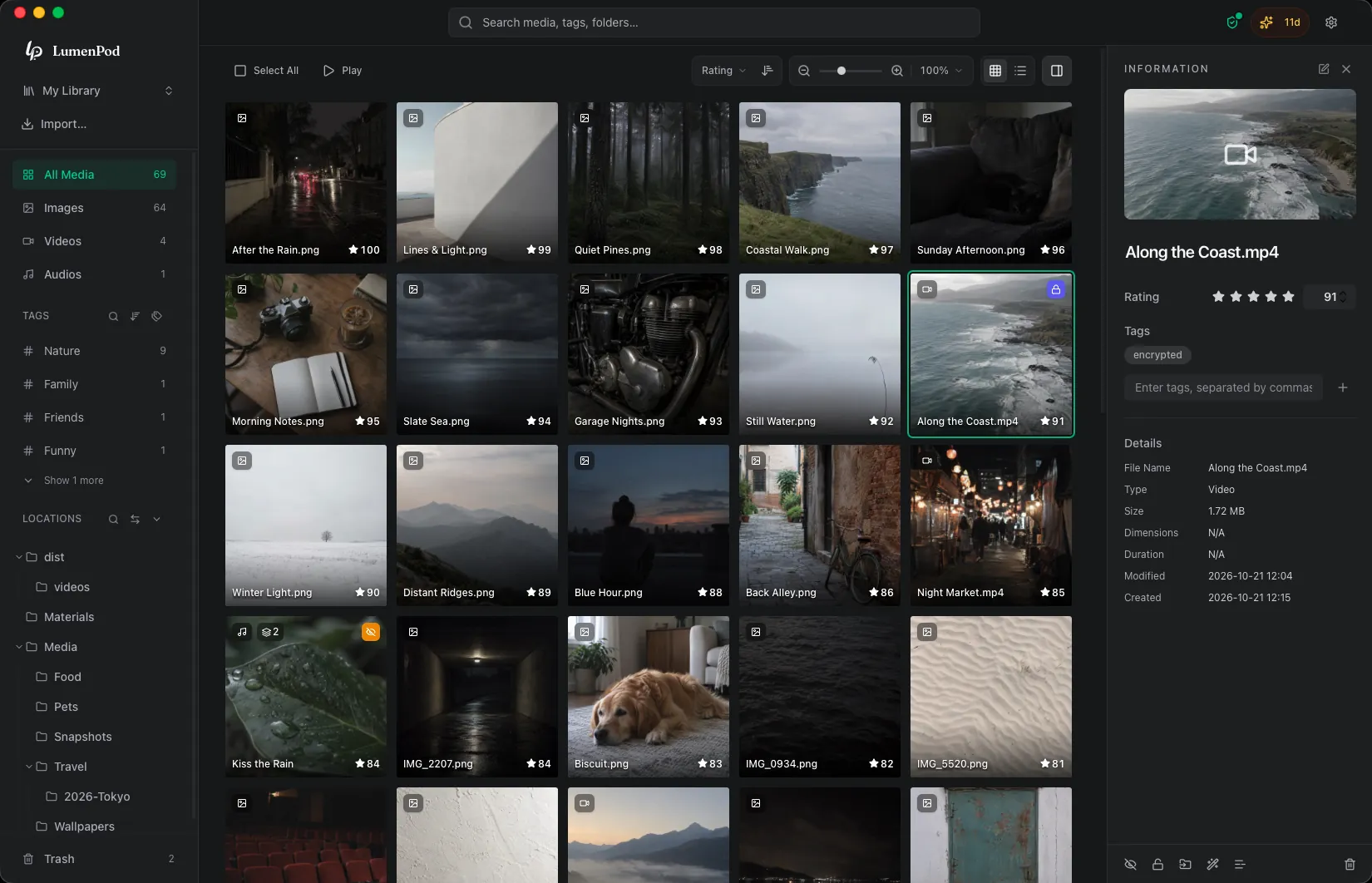
Private spaces and encrypted playback
One password. One space.
Each password opens its own vault. Other vaults stay unlisted.
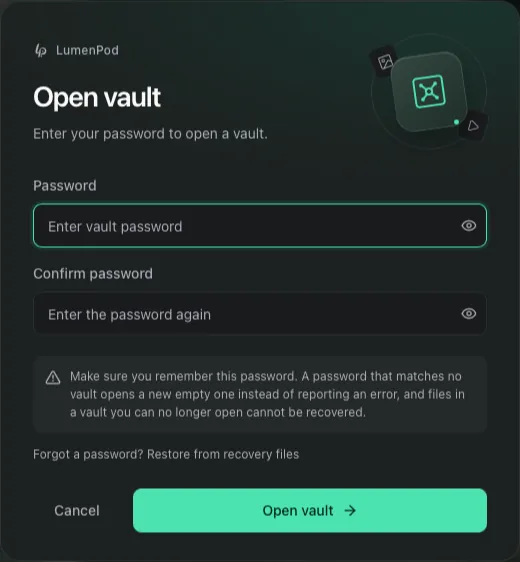 Inside your vault ↗
Decrypt as you play.
No decrypted video file on disk.
In this view3 / 6

00:0000:24
Details
Along the Coast.mp4
Tags
- Type
- Video
- Duration
- 00:24
VideoInteractive illustration
Resources6
- Along the Coast.mov3840 × 2160 · 2.4 GBShown
- Along the Coast 1080p.mp41920 × 1080 · 410 MB
Cover 1
- Along the Coast.jpgShown on the card
Subtitles 2
- Along the Coast.en.srtEnglish
- Along the Coast.fr.srtFrench
Others 1
- Along the Coast notes.txtTravels along
Resources0
Added by name and type. The file comes later.
Cover
Subtitles
Others
Local AI search
Search by meaning
Describe what you remember. Find matching photos and videos with AI running on your Mac.
No media uploads
Your media.
Your Mac.
Hide from everyday browsing. Encrypt for a separate password.
Privacy on a shared Mac ↗

Only with your key.
Sample collection · IllustrationYour existing folders
Right where
you left it.
Build a library without moving your originals.
Keep files in place ↗External drives ↗Your files stay yours
The trial ends.
Your access stays.
Keep adding, organizing and playing your media for free.
What stays free ↗Pricing
One purchase. All features.
Try every feature free for 14 days.
Pay once for the app and all future updates.
What's included
- Multiple libraries
- Offline drive catalog
- Password-protected vaults
- Encrypted video playback
- Hide & batch encrypt
- Local AI search
- Local network sharing
AI search requires a model download. · Email support
14-day free trial
All features, with no account or card required.
Free after the trial
Keep adding, organizing, playing and exporting your media, and opening existing vaults. Nothing is deleted.
Pro unlocks hiding and encryption, creating additional libraries, local AI, hover video previews and local network sharing. Trial and free features ↗
Collection guides
A little order for the things you keep.
All collection guides ↗07 / Encrypted playback
Play Encrypted Videos on Mac Without Exporting a Decrypted Copy
Read the guide ↗Privacy & vaults
How to Password-Lock Photos, Videos and Audio on Mac
Read the guide ↗Frequently asked
Questions before you download.
Learn about activation, privacy, and keeping access to your files. For anything else, write to support@lumenpod.app.
Which macOS versions are supported?
The direct download requires macOS 14 or later and an Apple Silicon Mac (M1 or later). Intel Macs are not supported.
Which languages is the app available in?
English, Simplified Chinese, Traditional Chinese and Japanese. The app follows your Mac's language, and you can choose another in its Settings → Appearance. The website's language menu does not change the app.
Is there a free trial?
Start a 14-day trial with every feature from the direct-download app’s first-launch screen. No account or card is needed. The paid Mac App Store edition has no trial.
How many Macs can I use?
A website license covers up to 3 Macs you own. Choose a license below the feature demos; manage activation codes and devices on your orders page.
Will my files move or upload?
The direct-download edition catalogs files in their existing folders. Your media is not uploaded to LumenPod servers; encryption happens locally. License activation and checks require internet access.
Can I keep different collections apart?
Yes. One app can hold several libraries, such as family photos and work footage, each with its own items, collections and trash. Switch between them in the sidebar; tags are shared. Deleting a library moves its items into another one and never touches your files.
If my license lapses, do my vaults lock?
No. After a trial or license ends, you can keep adding, organizing and playing media, and vaults can still be opened with the appropriate password. Hiding, encryption, multiple libraries, local AI and other paid features require a license. Nothing is deleted.
What's the refund policy?
Website purchases have a 14-day refund window. Request a refund from your orders page. Mac App Store purchases and refunds are handled by Apple.
Does hiding encrypt my files?
No. Hiding changes the library view. Encrypt selected files to protect their contents, and check any unencrypted originals or backups you keep outside the vault.
What do separate vault passwords protect?
Each password opens its own vault; the dialog does not list the others. This is app-level separation, not a guarantee that disk inspection cannot reveal encrypted data or metadata.